Bitrix24 CoPilot: Using AI Directly in CRM, Tasks and Communication

Paul Streck
03. June 2026
Artificial intelligence is increasingly evolving from a separate tool that is only used when needed into an integral part of modern work processes. For most companies, the question is therefore no longer whether AI makes sense in principle. What matters far more is in which areas it genuinely makes everyday work easier and provides noticeable relief.
In Bitrix24, the AI features are bundled under CoPilot and integrated directly into the familiar work areas — including CRM, tasks, chats, video calls, websites and team collaboration. As a result, users don't have to switch between different services, copy information manually or transfer data from one system to another. Many work steps can be completed directly within the existing working environment.
However, a widespread misconception about artificial intelligence still persists. It is often expected that AI will completely replace employees or solve business tasks automatically without any further guidance. In practice, the greatest benefit usually does not come from radical change, but from optimizing small, recurring processes that repeat dozens of times in everyday work.
Bitrix24 CoPilot Explained Simply
When people talk about artificial intelligence, many first think of a separate chat in a browser or an app: you ask a question, receive an answer and then manually transfer the information into your own work tools. In Bitrix24, this approach works differently. CoPilot is not a separate program or an additional service, but an integrated AI assistant that works directly within Bitrix24.
CoPilot supports employees with everyday tasks right where they already work: in the CRM, in tasks, chats, video calls, emails and other Bitrix24 tools.
There is no need to open additional tabs, copy conversation histories, transfer text between different services or manually create tasks from meetings. It is precisely these small intermediate steps that often cost more time in everyday work than they appear to at first glance.
At its core, CoPilot can be understood as a digital assistant that takes over part of the recurring work. It does not make decisions on behalf of employees and does not replace skilled professionals. Instead, it helps to complete routine tasks faster, reduce manual work steps and make existing work processes more efficient.
Where Can AI Be Used in Bitrix24?
One of CoPilot's strengths is that the AI assistant is not limited to a single tool or an isolated area. The AI features are embedded into various work processes in Bitrix24 and can therefore be used in many places in everyday business — from customer communication and meeting follow-up through to project work.
The most important areas of application for CoPilot in Bitrix24 are:
- CRM CoPilot supports work with customer data, helps with analyzing communication, can structure information about deals and reduces the effort of manual data entry.
- Tasks and projects When creating tasks, descriptions, checklists and workflows, CoPilot can help formulate content faster and organize team processes more clearly.
- Chats and collaboration In internal communication, CoPilot helps to process messages, discussions and decisions more efficiently and to capture important information more quickly.
- Emails and text messages CoPilot can be used to create, edit, translate and optimize texts in a wide range of formats — for example, for customer emails, internal messages or short reply templates.
- Video calls and meetings After meetings, CoPilot helps to summarize key points, record agreements and structure information clearly.
- Company feed and internal communication For posts in the company feed, announcements, internal news or messages to employees, CoPilot can draft suitable texts or revise existing content.
- Websites and landing pages CoPilot can also help with work on websites — for example, developing page structures, creating texts or quickly preparing individual content blocks.
- Bitrix24 mobile app Some of the AI features can also be used on the go. This allows employees to work on tasks, messages and information directly from their smartphone, without being tied to a desk in the office.
CoPilot is not intended to be a separate tool that has to be launched manually for every task. The central idea is to support employees directly while they work and to reduce recurring steps in everyday work.

Who Benefits Most from CoPilot in Bitrix24?
The AI features in Bitrix24 are not restricted to a particular role or a single department. CoPilot can be used anywhere employees regularly work with texts, tasks, communication, customer data or larger volumes of information.
CoPilot in Bitrix24 is particularly helpful for the following target groups:
- Management and business owners CoPilot helps to capture information faster, keep an eye on tasks, obtain short summaries of meetings and reduce recurring routine tasks within the team.
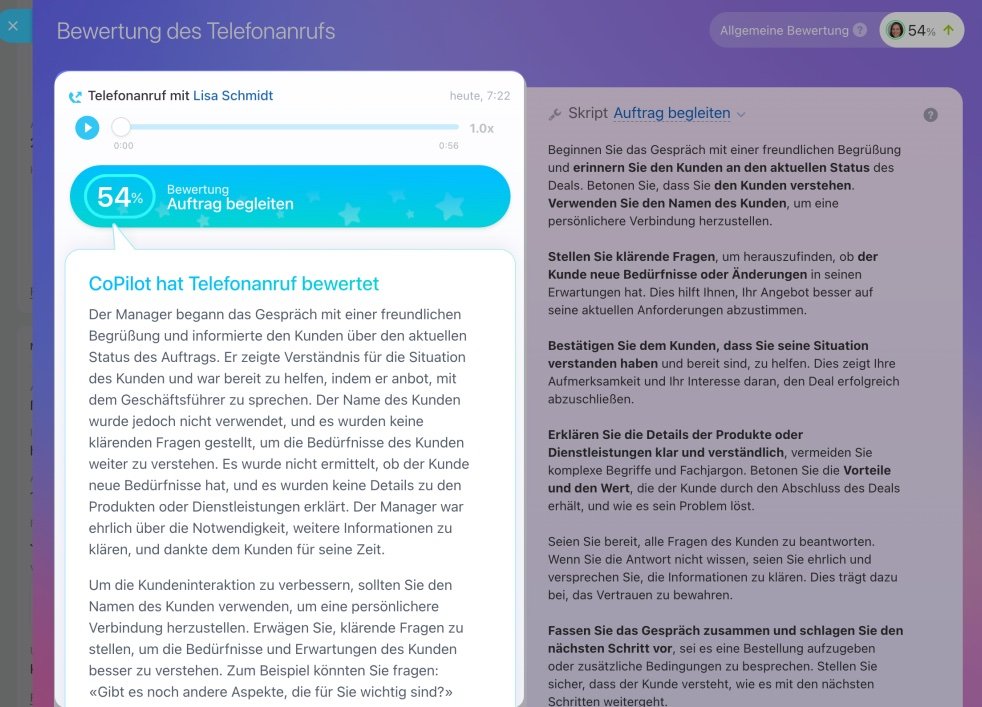
- Sales staff In sales, CoPilot can simplify working with the CRM, prepare customer communication, generate suggested replies, record agreements and support the analysis of conversations.
- Project managers In project work, CoPilot helps to create tasks faster, structure discussions, prepare checklists and organize work processes clearly.
- Marketing and content teams CoPilot can help with creating texts, posts, descriptions and advertising materials, and with processing larger volumes of information.
- HR departments In HR, CoPilot can be used, for example, for internal announcements, job descriptions, preparing application documents or communicating with candidates.
- Support and customer service teams For many recurring inquiries, CoPilot helps to respond faster, structure information more clearly and reduce the daily workload.
- International and distributed teams CoPilot is particularly useful for companies that work in multiple languages or communicate with employees, partners and customers from different countries.
No in-depth technical knowledge and no programming skills are required to use CoPilot. Many teams start with simple use cases — such as creating texts, following up on meetings or working with tasks. It is precisely these everyday scenarios that often demonstrate most quickly the practical value AI can offer in Bitrix24.
What Should You Consider Before Using AI?
Despite the rapid development of artificial intelligence, AI should above all be understood as a work tool — not as a fully autonomous solution that manages business processes independently without human involvement.
CoPilot can speed up workflows, reduce routine tasks and prepare information more quickly. The final result, however, still depends on people: on the clearly formulated task, the review of the content and the professionally correct decision.
The goal of CoPilot is not to replace employees. Rather, it is about simplifying recurring work steps and creating more time for tasks that require attention, experience and responsibility.
It is precisely this approach that helps companies introduce AI realistically and without inflated expectations. This makes it possible to identify, step by step, use cases that genuinely bring practical value to the team in everyday work.
In the following posts, we will show in more detail how CoPilot can be used when working with texts, tasks and sales processes — and what companies should keep in mind when integrating AI meaningfully into their workflows.